February 21, 2020

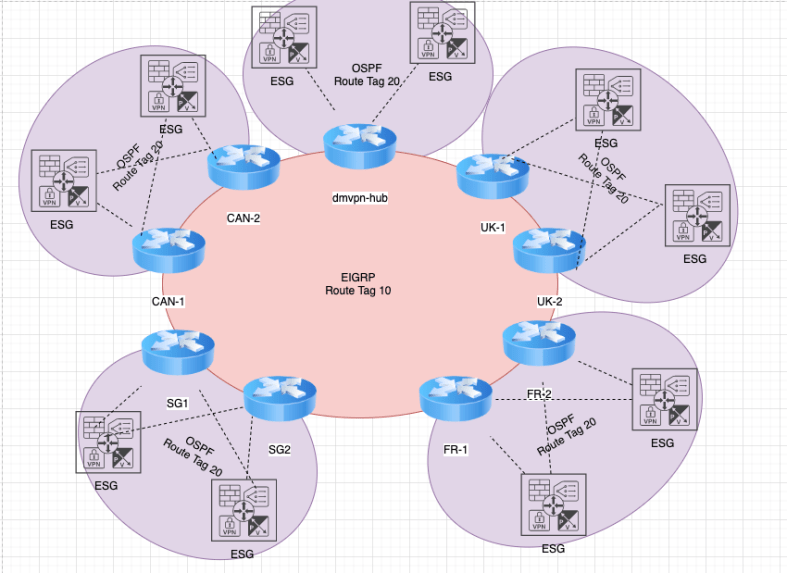
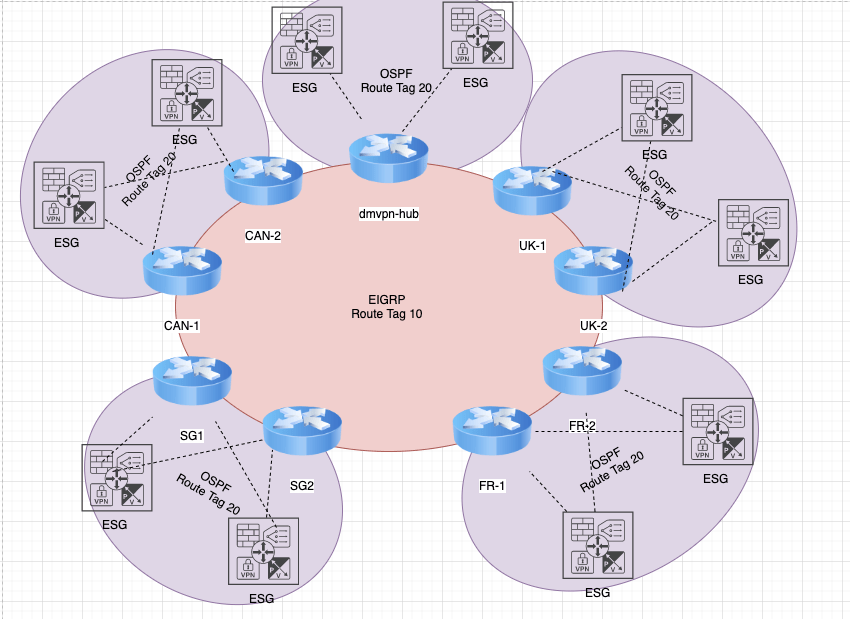
This week has been centered all around DMVPN & VMWare NSX. Earlier in the week , I was addressing an issues with routing loops observed . In the deployment I have two spokes in Canada that are Cisco 6504-E devices. The control plane for EIGRP come up with neighborships between the Hub and Spokes. Routes are passed from the Spokes down the ESG in the local envrionment , however data plane traffic is not successful. I see traffic leave the ESG and hit the local edge and then die. When I remove the encryption map. The traffic routes successfully.

I consulted with Cisco TAC who advised the configuration should be supported, but when running a packet capture the only issue observed is that encrypted traffic never even enters the local vlan interface . This is when I decided to apply some ACLs on the local vlan interface to see if any traffic was arriving.

Even stranger once I applied these ACLs to with the “log-input” command traffic across the environment began to work. I am waiting on Cisco TAC to advise on why this works. I removed the log-input from the ACL which seems to break the data plane again.

Cisco TAC responded and apparently the log-input forces all the traffic to he software switched instead of CEF which allows the traffic to pass. Cisco advises that the C6500 does not support DMVPN without a SPA Carrier Module.
February 16th , 2020

This was a busy week. Last weekend I performed some hardware maintenance on Cisco 6506, continued deployment of a MSSP integration and had some time with a DMVPN deployment and troubleshooting. When time permitted I was reviewing CCIE OSPF Material.

Continuing on my hardware upgrades , I swapped a 4 x 10G card for the 16 port variety and did some new fiber run to comply with an LC Fiber form factor. For some reason the previous engineer had one side LC and another SC which drove me nuts. I did add some labeling and well . The only stand out item was in order to allow for the change. I needed to gain some power on the chassis for the 16 port cards. I also swapped out the 2500W Power Supply units for the 3000W variety. The power allocation was just under the 24 Amps allowed on the PDU combined but it did the trick.

A great deal of the time this week was ensuring proper integration with my firewalls and other devices were properly logging to my Alienvault SIEM service. I came to a better understanding of how the service depends on the Device Category and how it fits into the service plug-ins and event detection. Testing was successful for static defined alerts. I plan to run some test next week for some of the Correlation Events the system can detect.

A few months ago, I deployed dmvpn solution and was engaged to an issues with the customer having packet loss issues. The return traffic was learning a path back to the hub via a peer spoke instead of the hub network.

I have a new site to deploy which I will put together more in my next post.

January 20th 2020

Had some fun over the last few days. Performed hardware / software upgrades on Cisco 6506-E. Configuration investigation into peering with Azure Cloud Services. Deployment work for a managed MSSP service with Alienvault as the SIEM solution. I also got caught up with my favorite Podcast The Packet Pushers.

This week , I performed an upgrade on a pair of remote 6500 from 12.x to 15.1(2) as well as exchange 4 x 10 G port to a 16 x 10G port linecard. The upgrades were successful. I did learn one caveat take away which is that these chassis will maintain power consumption for the last slot in the chassis even if there is no linecard in the slot. I was able to make use of some tcl scripts to help in the pre and post maintenance testing. The script are a simple ping test in a loop over a list. I would like to learn more about this but do not want to deviate from the current study plan material.

While working with one of my new customers, I got the opportunity to get some exposure to the Azure Cloud platform private peering session. My firm sells a NNI service for a direct connection to the Azure cloud. Seems likes a really great service to connect cloud virtualization with the Datacenter. There is some unique ways to build a co-location environment to the virtual deployment in the Azure cloud.

Deployment of my firms new MSSP service was interesting. The service is running a sensor internally where it captures the information and produces the reporting. I was let down that the service has some limits in terms on customization but the service itself has effective reporting. Over the next week I expect to tune the reporting parameters.

Last item was the Packet pushed Heavy Networking podcast covered “Creating a Single Source of Truth for Network Automation”. This podcast covered the theory behind creating an automation pipeline. My interest was geared toward more of how I could make use of Netbox more effectively in this pursuit. Fortunate there is an episode from May 2019 covering Netbox more in detail.

Referenced Links

https://azure.microsoft.com/en-us/resources/videos/azure-expressroute-how-to-set-up-azure-private-peering-for-your-expressroute-circuit/

https://packetpushers.net/podcast/heavy-networking-498-creating-a-single-source-of-truth-for-network-automation/

January 15th 2020

Today I was involved in a deployment of a new MSSP service. The provider is running a virtual sensor (ubuntu machine) in a vm. The box collects SNMP Trap data as well as SPAN (Switched Port Analyzer) traffic from the corporate user network. The services uses a backend SIEM service Alienvault. The most important lesson came from the interaction with VMware.

For the first time, I did some network implementation with vSphere. Since this system acts as a Network Intrusion Detection Systems (IDS) the vSwitch need to process promiscuous traffic . Apparently the vSwitch itself needs to the security setting to allow Promiscuous traffic. Promiscuous mode eliminates any reception filtering that the virtual machine adapter performs. All guest operating systems would receive all the traffic observed on the wire. The sensor vm was only seeing broadcast / udp traffic before the feature was permitted on the vSwitch. I ensured the vSwitch was isolated to the vms that needed to share the traffic. I understand this is not exciting information to learn but the experience today was real work work on the platform which I am excited to gain more exposure.

I did spend some time listening / watching some of the VCP65-DCV (vsphere 6.7) on ittvpro this evening. The introductory video covered concepts which I generally understood, shared resource (Disk , CPU, Network) some the file types and their significance.

Lastly this morning , I was reviewing some of CCIE material covering EIGRP. Revisiting the classic implementation and the named version with address families. I did learn that after Cisco IOS 15.4. This is important to have the upgrade if the environment is 10/40 Gbps or higher since the Wide Metrics should be implemented. Classic Metric is not able to distinguish larger than 10Gbp links. The material also discussed the important that to effectively manipulate the routes with the Cost function , to offset the delay since this is generally and easier change to make when compared to the bandwidth.

January 10th, 2020

Since my last blog post, I did enjoy the holiday season but have a few items to get caught up on. In this post I discuss hardware upgrades coming up this week, some python scripting for IPAM with a link to a great Netbox resource and some compliments to the guys at https://packetpushers.net/

I also have some upgrades of some Cisco 6500 in my remote data centers. The upgrade is actually a secondary factor. I am swapping 2 x WS-X6704-10GE for WS-X6716-10G-3CXL. The primary motivation is to regain power redundancy since they are running in Combined mode since my power supplies are currently at 1153W each and my system is using 1193 currently. These cards use 300-330W each and the combined unit is rated as using 475W. If I can shave enough off to gain redundancy I will be thrilled or at least I gain some capacity on the switch.

One of my professional goals is to replace the existing IPAM system. I began by moving the Network aggregates into Netbox. The the prefixes along with the associated vlan , customer information , etc. I did write some python scripts to help massage the data for import into Netbox. I wrote a second script to pull the “free” ip subnets available to customer alot of my learning came courtesy of another blogger thank you to Przemek Rogala. My next step is to add the functionality to add new network devices and connections.

I have been consistently studying the CCIE material as well over the last few weeks. It was timely revisit since I ran into a issue with one of my customer recently in regard to a Spanning-Tree issue where I had a 1 gig link being preferred over a 10G link, which initially caught me off guard but I was able to quickly augment the port priority to shift the traffic gracefully to the higher capacity link.

The last item to talk about was the Packetpushers podcast. This week I was invited to their slack channel which is great so far. Interacting with other engineers issues/complaining in real time helps me understand this field in a more personal way. Then Greg , Drew and the guys on the Heavy Networking (Jan 10, 2020) discussed about the important of starting a blog. This gave me the courage to come back and post something today and some of the earlier posts I began with. Highly recommend the whole family of Podcasts at PacketPushers.

I hope to post more early next week perhaps about my studying and some of my other tasks I have at work.

December 15th 2019

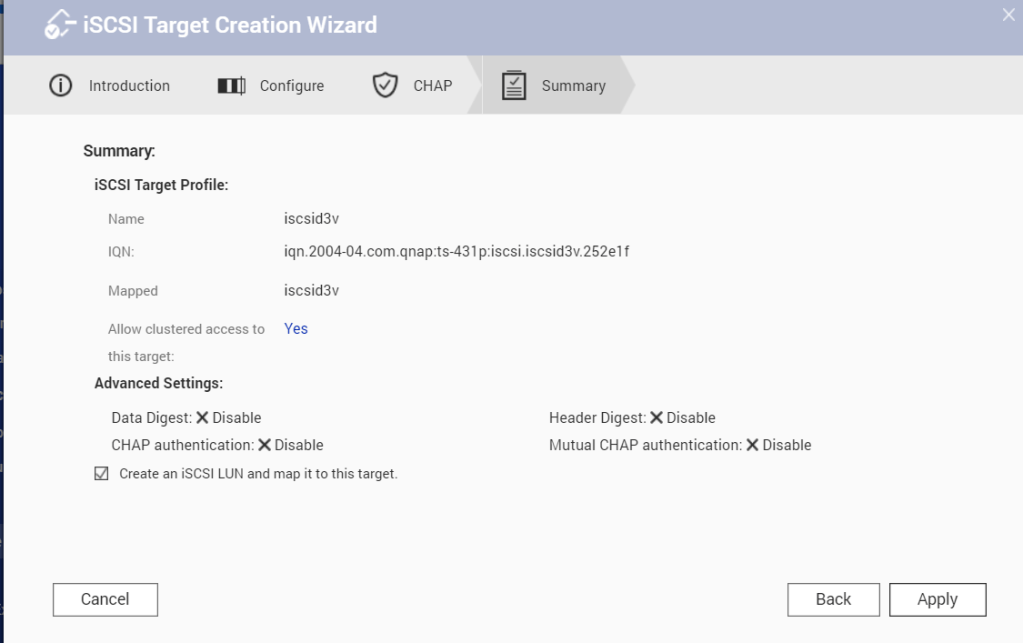
Creating iSCSI strorage on my local QNAP device for my virtual servers. iSCSI is a network protocol that allows to share my NAS space (a LUN) as a virtual disk with clients. iSCSI Target Profile name – iscsid3v

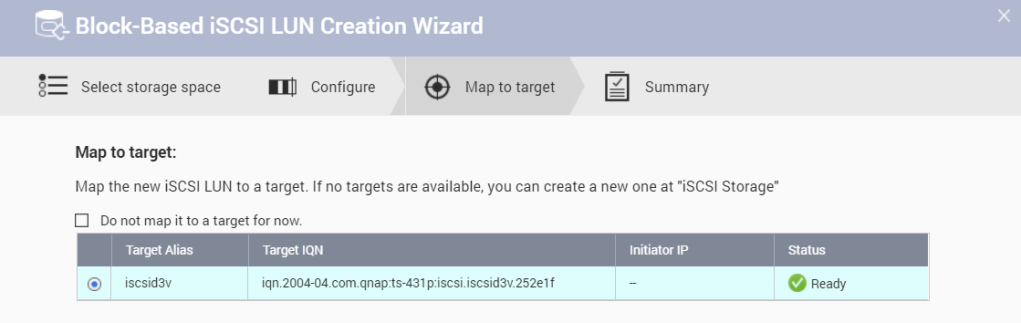
LUN NAME – iscsid3v_0. I was able to connect my Windows 10 Machine to the iSCSI storage environment.

December 14 2019

The last few days I have made a decision to lab more in depth. I recently added a QNAP NAS to my home lab . I need to intergrate GNS3 back in for Network lab scenarios. I ran into some issues and upgraded to GNS3 version 2.2.3 along with the GNS3 VM. I am having difficulty running the QEMU images because the path appears the QEMU binary is pointed to my Windows directory.

I attempted to remove the local server but this did not seem to help change anything.

I made a reddit post to see if the community in gns3 could offer some assistance. I do plan to move my environment over to a dedicated Ubuntu box.

I did get the GNS3 stable on my Windows Laptop and have the storage on the NAS for the VMs.

NAS

This blog is for my new NAS deployment in my home. I purchased a QNAP 4 Disk drive TS-431P. There a 4 x 3TB Westrern Digital Drives.

I chose a RAID5 array with 3 disks. I created 2TB partition out of the 9TB to copy add data off my various devices and external hdd to collapse to a central location.

I have ordered an additional disk as well to be prepared for a drive failure. Enabled a Weekly test at 630 am on Mondays to test the drives.

After adding some files , I came across that I can run WordPress and Media wiki from the NAS itself. A wiki would be nice to maintain to help document my journey.

11/30 Next Course of Study

I am interested in pursuing another industry certification. Pursuing these certifications gives me satisfaction while I learn more about my overall profession. I have been interested in achieving the CCIE certification , but want to have some broader IT skill sets before I go deeper specific into a expert level vendor certification.

CISSP , AWS Network Specialty , AWS Cloud , Linux +,Cloud+,CCIE, and of course automation. Where to begin ? I have CCNP , Security+, F5 Certified Admin. I would like to obtain Linux+ , then move on to the CISSP.

In addition to this blog, I can start managing my git account as a first step toward building my professional portfolio . I would like to continue to learn automation as a job tool and not as a dedicated programmer at this point.

  1. Document Home Network
  2. Expand Github Presence
  3. Blog / Document Daily Work
  4. Earn Linux + , CISSP , Network +

November 29,2019

The purpose of this blog is to document my progress as a Network professional. I intend to document my daily tasks that add to my knowledge base as well as some study notes.

I have been working as a Network Admin/ Engineer for a few years and I am currently looking to deepen my skills set. This is a personal blog for my own benefit and to share when I can contribute to the community.