
I recently did a presentation for Network User Group (PA-NUG) and I shared something Ive recently used Netlab hosted on Codespaces to do some testing and validation of Network Configuration. The video is a short demonstration of how I used it to launch a network lab in codespace and run some netlab validation tests for BGP
Tag netlab

Netlab
To be honest , for building labs sucks . If you wanna quickly and cheaply build out multiple node network topology you can follow my quick Deployment section and be running in 10 minutes with Infrastructure as code (IaC). For more details checkout Ivan page – https://netlab.tools/
Key Take Aways with Netlab
- Describe high level topology in a YAML format without specific implementation details
- configure Ip Addressing Schema , routing protocols , VLANS and VRF
- Be up and running with a CLI network topology in minutes
Deployment
- Ubuntu 20.04 in any cloud or vm
Installation
sudo apt-get update && sudo apt-get install -y python3-pip
python3 -m pip install networklab
netlab install -y ubuntu ansible libvirt containerlab

Getting Started
netlab show images
mkdir lab
touch lab/topology.yml


netlab up
netlab connect r1
netlab connect <string>
vtysh
netlab status
netlab restart
cat /etc/frr/daemons
Netlab Examples
If you want to change the provisioning- or device configuration templates, you can:
- Create your own device configuration templates: copy a system device configuration template into templates/module/device.j2 file1 and modify it. You can have custom device configuration templates in the current directory or in the
~/.netlabdirectory. - Create your own device provisioning template: copy a system template into provider/device-domain.j2 file and modify it.
- https://github.com/srl-labs/containerlab
- https://containerlab.dev/
- https://netlab.tools/labs/clab/
- https://netlab.tools/install/ubuntu/
- https://my.ipspace.net/bin/get/NetTools/N2%20-%20What%20Can%20netlab%20Do.mp4?doccode=NetTools
- Running this in an Ubuntu Digital Ocean
- vrnetlab/vr-ftosv
- https://netlab.tools/tutorials/#more-tutorials
- https://netlab.tools/tutorials/#more-tutorials

Topology
| Top Level Element | description | Links |
|---|---|---|
| default | ||
| addressing | ||
| Nodes | Lab Devices can be a string | https://netlab.tools/nodes/ |
| groups | Inventory Groups | https://netlab.tools/groups/ |
| links | define connections between nodes | (https://netlab.tools/links/) |
| module | bgp , ospf , etc | https://netlab.tools/modules/ |
| name | optional used to name linux bridges for vagrant | |
| provider | libvirt , virtualbox , clab , external | physical hardware can be used |
| tools | Third Party tools | https://netlab.tools/extools/ |
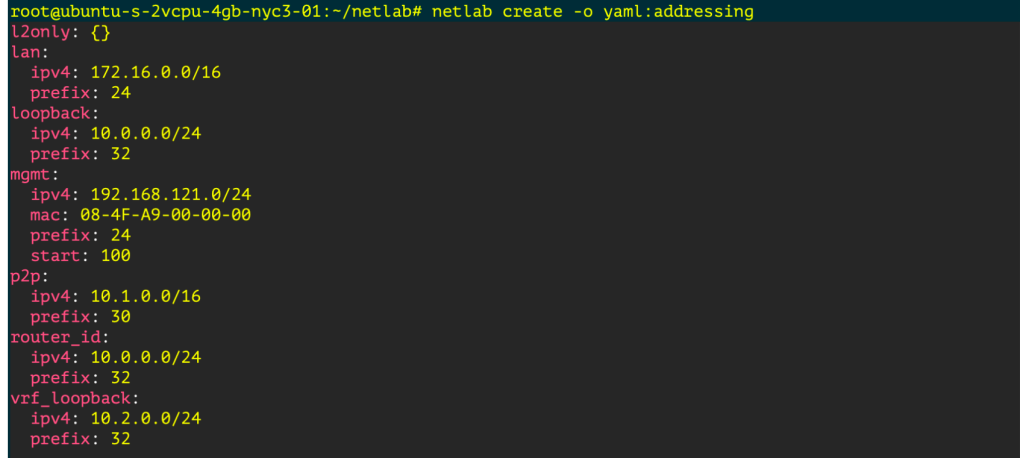
See Addressing Plan
`netlab create -o yaml:addressing`
Monitoring Development Terraform dev
Creating a Graph
pip3 install graphviz
netlab create -o graph:bgp
dot graph.dot -T png -o netsim-graph-bgp.png
 Loud Networking