

One of the more important technical topics I have learned over the last few years is how basic networking functions on traditional linux servers. The goal of this is to provide some basic troubleshooting and system administrator on a Linux System comparable to a Network Engineer.
As a reformed Network Engineer , I find myself working on Linux boxes more often than not , What I am looking to provide here is offering Linux Networking helpful commands and tips from a traditional network engineer.
Its my goal to have this as a series to cover the following practical Linux Networking Topics

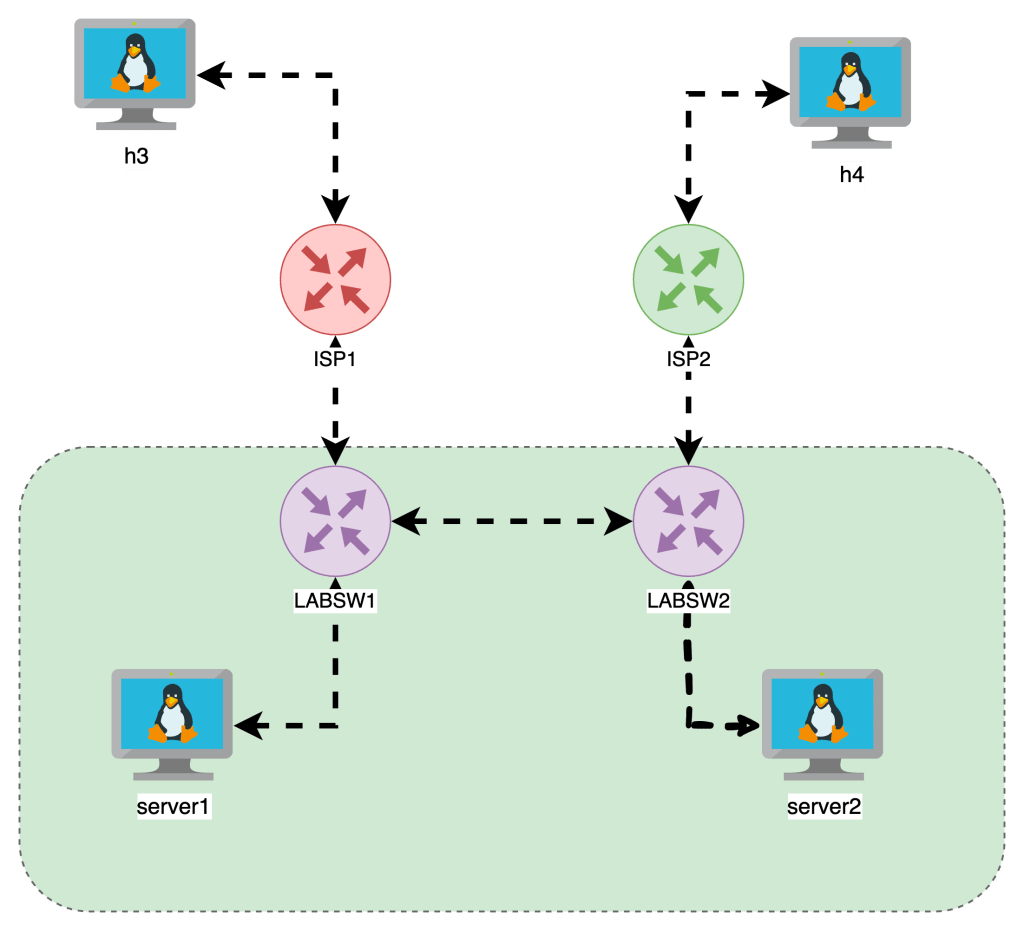
I built this lab our with Netlab and below is a base topology diagrams, one I drew another is from netlabs built in graph feature.

Getting Started
- I built out a topology on Netlab
- The VMs are running Alpine Linux
- FRR is running on the “LABSW” devices
Required library
In order to do the things , we need iproute2 install on our machine , its seems to be standard so you can check or install with the following
- Ubuntu
apt list iproute2apt-get install iproute2
- Alpine
apk list iproute2apk add iproute2
Interface Functions
Often we just wanna add IP Address and interfaces , Check the interfaces running on the box , state and IPs associated
show ip int brief : ip -br a
root@netlab:~# ip -br -c a
lo               UNKNOWN        127.0.0.1/8 ::1/128
eth1             UP             10.108.0.4/20 fe80::bcae:58ff:fe72:e8d5/64
virbr0           DOWN           192.168.122.1/24
virbr0-nic       DOWN
docker0          DOWN           172.17.0.1/16
br-7521756542bb  UP             192.168.121.1/24 fe80::42:f3ff:fe25:7c84/64
Wanna see Interface Physical Errors: ip -s -c -h link
Adding Interfaces and IP Addresses
Adding a Layer 2 Interface
sudo ip link add <BRIDGE_NAME> type bridge
sudo ip link set dev <BRIDGE_NAME> up
Adding a Layer 3 Interface
ip addr add 192.168.114.1/24 dev lo label lo:114
Routing
The difference between a Router and a server is the ability to forward IP packets that are not to the destined interface.
Linux Servers by default do NOT FORWARD traffic to IP Addresses , and like older Cisco switches we need to make sure IP Forwarding is enabled.
Enable Packet Forwarding
When we think about Routing , we need to check if the Linux Kernel is enabled to forward traffic between interfaces. The following commands check if FORWARDING is enabled and how to enable it.
This allows the server to forward traffic that arrives on ONE interface destined for another

In the topology the “LABSW and ISP” devices have FORWARDING enabled.
Routing Tables & Context
Routing in linux is handled by different route tables by default there is LOCAL, MAIN , DEFAULT route tables in linux.
In the image below is a diagram with two route tables , one for LOCAL , another for MAIN. The point is MAIN is the “routing” table which shows how packets will be treated, the LOCAL is the highest priority and lists the local interface IPs and the broadcast domains.
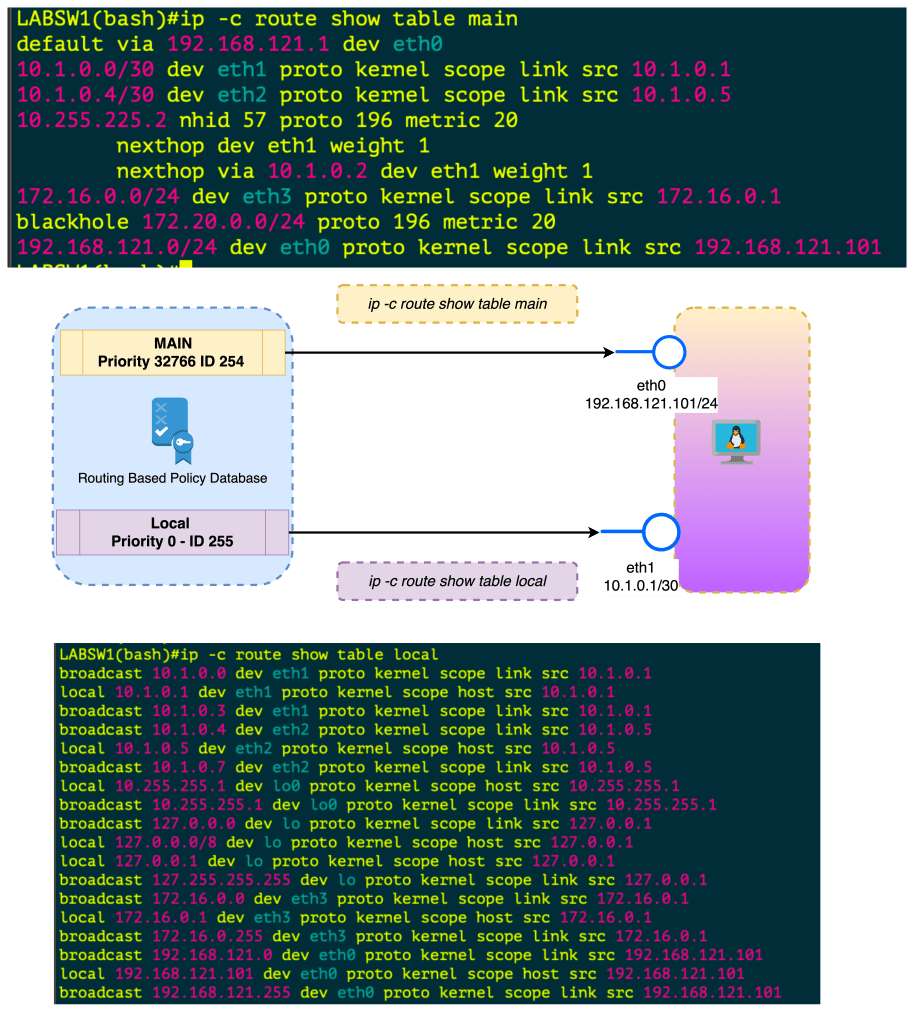
When you create an interface , assign IP Address this is done in the Kernel in the LOCAL routing table. If you want to FORWARD traffic that arrives in one interface over to another interface , this needs to be enabled . Once its enabled this routing is done in the MAIN routing table.
In all reality , you can just check ip route to see the main route table
Policy Based Routing
- ip rule manipulates rules in the routing policy database control the route selection algorithm.
- RPDB Routing Based Policy Database which selects routes based on some set of rules
- Each policy routing rule consists of selector and action predicate
- The RPDB is scanned in order of decreasing priority
- The selector of each rules is applies to { source/destination address , incoming interface , tos and fwmark}
- If selector matches the packet the action is performed
- The action predicate may return with success or failure , if fail it continues RPDB terminated
- The action is selecting the nexthop oputbound interface
- At Startup there is Three Rules or Three Route Tables
| Priority | Selector | Action | Route Table |
|---|---|---|---|
| 0 | match anything | lookup routing table local (ID 255). The local table is a special routing table containing high priority control routes for local and broadcast addresses. | LOCAL ID 255 |
| 32766 | match anything | lookup routing table main (ID 254). The main table is the normal routing table containing all non-policy routes. This rule may be deleted and/or overridden | MAIN ID 254 |
| 32767 | match anything | lookup routing table default (ID 253). The default table is empty. It is reserved for some post-processing if no previous default rules selected the packet. This rule may also be deleted. | DEFAULT ID 253 |
Keys used for hash table lookups during route selection
| route cache | RPDB | route table |
|---|---|---|
| destination | source | destination |
| source | destination | ToS |
| ToS | ToS | scope |
| fwmark | fwmark | oif |
| iif | iif |
The route cache (also the forwarding information base) can be displayed using ip route show cache. The routing policy database (RPDB) can be manipulated with the ip rule utility. Individual route tables can be manipulated and displayed with the ip route command line tool.
Routing Based Policy Database Attributes
Each rule has a pointer to some routing table.
NAT and masquerading rules have an attribute to select new IP address to translate/masquerade.
Besides that, rules have some optional attributes, which routes have, namely realms. These values do not override those contained in the routing tables. They are only used if the route
did not select any attributes.
| Attribute | ||
|---|---|---|
| unicast | the rule returns the route found in the routing table referenced by the rule. | . |
| blackhole | the rule returns the route found in the routing table referenced by the rule. | |
| unreachable | the rule generates a ‘Network is unreachable’ error. | |
| prohibit | the rule generates ‘Communication is administratively prohibited’ error | |
| nat | the rule translates the source address of the IP packet into some other value. |
IP Rule manipulates rules in the routing policy database , the route selection algorithm
Policy based routing
Priorities
SHUT UP AND GIVE ME COMMANDS
| Command | Description | More |
|---|---|---|
sysctl net.ipv4.ip_forward | Checks if router can FORWARD Packets | |
sysctl -w net.ipv4.ip_forward = 1 | Sets FORWARDING for ipv4 | Makes Server a router |
sysctl net.ipv4.route.max_size | Check Routetable Size |  |
| Sets FORWARDING for ipv6 | |
| `ip -c route show table local` | Show the Local Route Table Reflects IPs and Broadcast Addresses on Interfaces , Kernel |  |
| `ip -c route show table main` | Show the Main Route Table also known as `ip route` shows how packets can be routes |  |
| `ip -c route` | ip route | |
ip route add 10.250.7.254/32 dev INTERFACENAME` | Add Static route with interface as the exit |
| Command | ||
|---|---|---|
ip -c neigh | Shows ip neighbors in color |  |
ip -c -br a | Show IPs brief |  |
ip -c -s -h addr | show ip address + stats in color in human readable form |   |
ip -c -s -d tcp_metrics | grep rtt |awk '{print $7 " " $1}' | sort | uniq -c | sort -nr | sort by longest rtt variance and the ip address | |
lsof -i | List open files including network connections | |
ip route show cache | Forwarding Cache | |
ip link add <BRIDGE_NAME> type bridgeip link set dev <BRIDGE_NAME> up | Add Layer 2 Bridge and bring up | |
ip addr add 192.168.114.1/24 dev lo label lo:114 | Add L3 Interfaces Loopback 114 with ip address | |
tc qdisc del dev <intf> root netem loss 10% | add 10% packet loss to interface | |
tc qdisc add dev <intf> root netem delay 200ms | Add 200ms delay to all traffic on interface |
 Loud Networking